


Tether is one of the easiest coins to fund a casino balance with, mainly because it's a stablecoin pegged to the US dollar, so you get the speed and convenience of a crypto deposit without the price swings that come with BTC, ETH, or SOL.
At MetaWin, you can either connect a Web3 wallet and transfer USDT through the Cashier, or send it manually to a MetaWin deposit address through Transfer Crypto. Whichever route you choose, the most important step is matching the network in MetaWin with the one used by your wallet or exchange.
This guide explains how to deposit USDT through both methods, which networks each one supports, and how your balance works across MetaWin's Tether casino games.
Why Deposit with Tether at MetaWin?
The main reason to use Tether at MetaWin is that its value stays far more predictable than most cryptocurrencies. USDT is designed to track the US dollar, so a deposit worth around $100 should still be worth roughly $100 when you start playing. With BTC, ETH, or SOL, the same balance can rise or fall before you have even placed a bet.
You still get the practical benefits of crypto when funding a USDT casino balance. Transfers usually settle quickly, do not depend on a card issuer approving the payment, and avoid many of the regional restrictions that can affect traditional deposit methods. Network fees can also stay low, particularly when you use a cheaper chain such as Tron rather than Ethereum mainnet.
That combination makes USDT easier to budget with. You know roughly what your balance is worth in dollar terms, and you do not need to keep checking the market to see whether its value has changed between your deposit, your bets, and your withdrawal.
Tether is also one of the most widely held and traded cryptocurrencies, so there is a good chance you already have some in a wallet or exchange account. If you do not, nearly every major exchange lets you buy USDT before sending it to MetaWin or connecting a supported Web3 wallet.
In practice, USDT gives you a fast crypto deposit without leaving the value of your casino balance at the mercy of the market.
Which Tether Network Should You Use?
USDT is not tied to a single blockchain in the way BTC, ETH and SOL are. The same token exists on several networks, but those versions are not interchangeable. The networks available at MetaWin also depend on which deposit method you use.
If you want to connect a wallet and play through Web3 Wallet, MetaWin supports :
- Ethereum: Choose this if your USDT is already on Ethereum or your wallet only supports ERC-20. It works almost everywhere, but the fee can be noticeably higher when the network is busy.
- Arbitrum One: This is a good pick if your USDT is already on Arbitrum and you want to avoid Ethereum mainnet fees. You still stay within the Ethereum ecosystem, but transfers cost much less.
- Polygon PoS: Polygon makes the most sense for smaller deposits because fees are very low. Just make sure your USDT is already on Polygon, as sending the Ethereum version will not work.
- OP Mainnet: Pick this if you already hold USDT on Optimism. It gives you lower fees than Ethereum mainnet without forcing you to move the funds onto another chain first.
If you want to send USDT into a balance held by MetaWin through Transfer Crypto, you can use
- Ethereum: This is the easiest option for compatibility, since most wallets and exchanges support ERC-20 USDT. The downside is that it can cost more than Tron or Solana.
- Tron: Tron is often the most practical choice when withdrawing USDT from an exchange. TRC-20 is widely supported, quick, and usually much cheaper than Ethereum.
- Solana: Solana works well if your USDT is already there or your exchange supports Solana withdrawals. Transfers are fast, and the network fee is normally tiny.
The best choice usually depends on where you already hold your USDT. Moving it on the same network avoids an unnecessary bridge or swap, provided MetaWin supports that network through your chosen deposit method.
Network mismatch warning
Only send USDT on a network that MetaWin supports. The network selected in your wallet or exchange must exactly match the one shown in the MetaWin Cashier. Sending on the wrong network can mean your funds never arrive.
The safest rule is to choose the network in MetaWin first, then select that same network everywhere else in the transfer.

Author's Thoughts
Matija Antic
With USDT, the network matters more than the coin. Pick it in MetaWin first, then match it everywhere else, and you've avoided the one mistake that can cost you the whole deposit.
Web3 Wallet vs. Custodial Wallet - What's the Difference?
With the Web3 Wallet method, you connect a self-custody wallet such as MetaMask or Trust Wallet and complete the deposit through MetaWin's Cashier. Once connected, you select USDT, choose the network, enter an amount, and approve the transfer in your wallet.
Transfer Crypto works better if your USDT is on an exchange such as Coinbase, Binance, or Kraken, or if you prefer a standard address transfer. You select Tether and the network in the Cashier, copy the address MetaWin generates, then send the funds from your wallet or exchange.
The main difference is how you start the transfer. Web3 Wallet connects directly to your wallet, while Transfer Crypto relies on a deposit address. The two routes also support different networks, so check which options MetaWin shows before moving any funds.
Good to know
You can use both methods on the same account. The better route usually depends on where your USDT is held and whether you want to connect that wallet to MetaWin.
What You'll Need Before You Start
Before you deposit, make sure you have the following ready.
- A funded source of USDT in either a supported Web3 wallet or an exchange account such as Binance, Coinbase, or Kraken.
- Enough USDT for the deposit and fees since your wallet or exchange may deduct a small network charge when you send.
- A registered MetaWin account so you can connect your wallet or open the Cashier and generate a deposit address. You can sign up here if you don't have one yet.
- The network you plan to use already confirmed in both MetaWin and the wallet or exchange you are sending from.
Once those are in place, you can choose between Web3 Wallet and Transfer Crypto and follow the steps below.
Method 1: How to Deposit USDT via Transfer Crypto
If your USDT is on an exchange or in a wallet you do not want to connect, Transfer Crypto lets you send it into a balance held by MetaWin. The process works much as it does on other Tether casino sites, but the network selection matters more because MetaWin supports Ethereum, Tron, and Solana for this route.
Step 1: Sign in to your MetaWin account
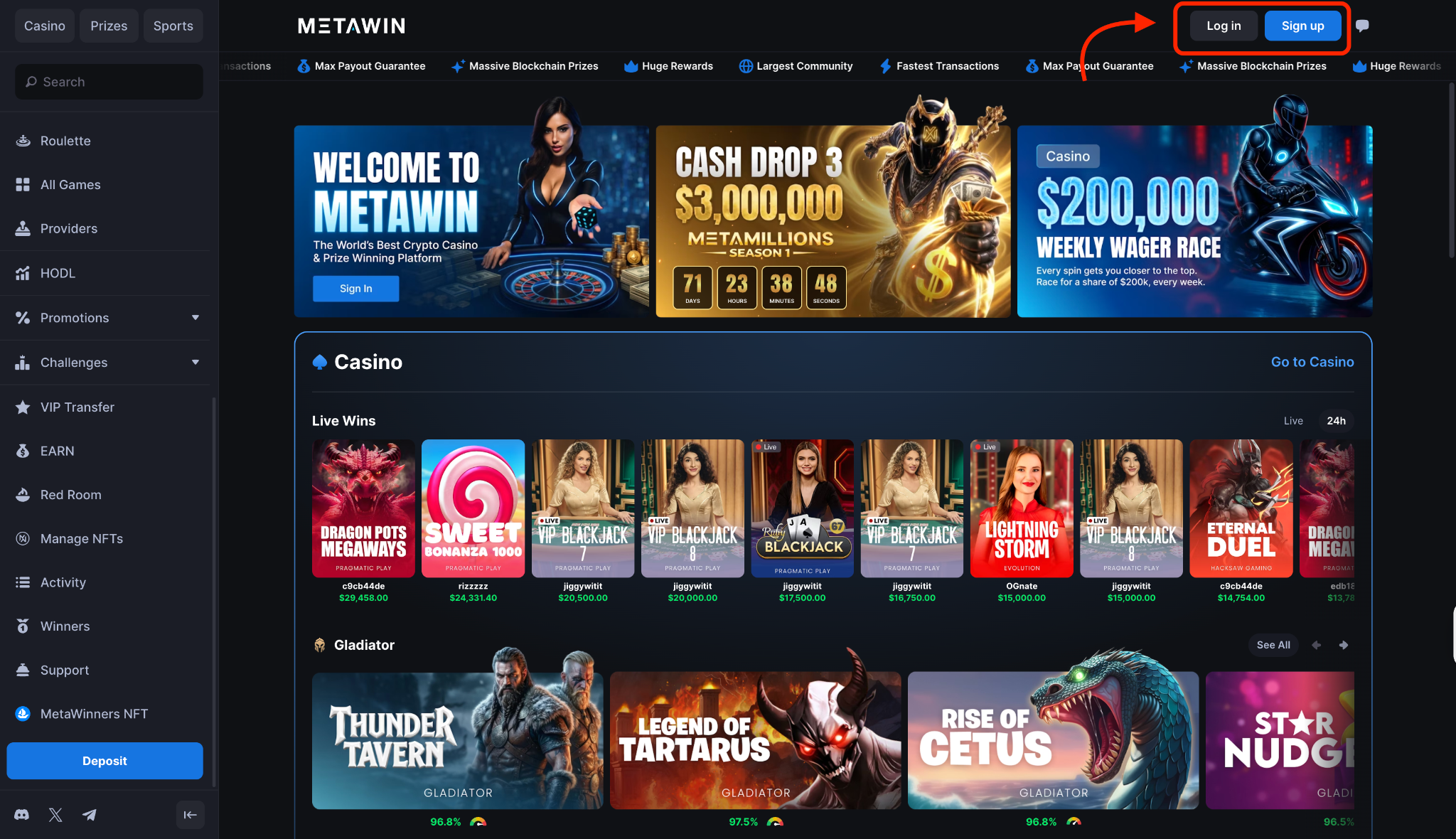
Open MetaWin and click Log In in the top-right corner. If you do not have an account yet, choose Sign Up, complete the short registration form, and return to the main lobby.
Step 2: Open the Cashier and select Transfer Crypto
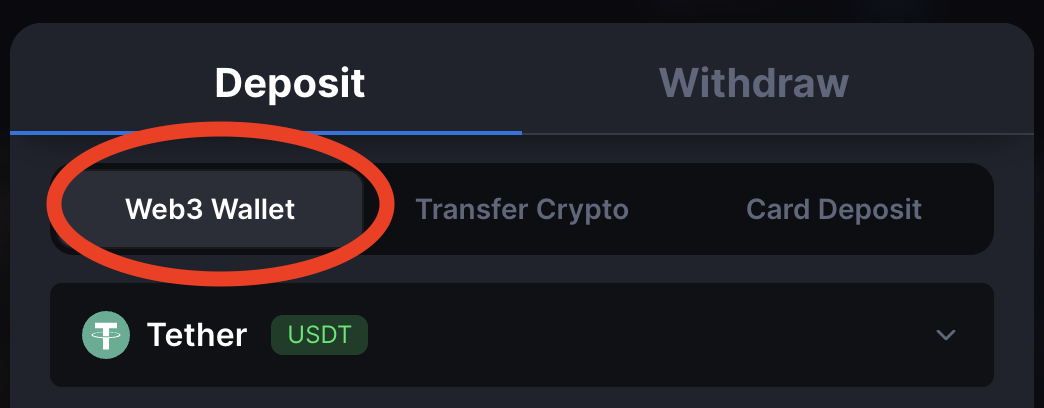
Click the wallet button in the top-right corner to open the Cashier. It loads the Web3 Wallet tab by default, so move across to Transfer Crypto to set up a regular USDT deposit.
Step 3: Select Tether (USDT) and choose your network
Open the currency dropdown and pick Tether. A second selector then appears with Ethereum, Tron, and Solana.
Important
The network you select here must match the one you use in your wallet or exchange. Funds sent through one network may not reach a deposit address generated for another.
Step 4: Copy the deposit address
Once you choose the network, MetaWin generates a unique deposit address and QR code. Check the network label and minimum deposit notice, then copy the full address or scan the QR code from your mobile wallet.
If the Cashier displays a memo or tag, copy that as well and enter it exactly as shown. If no extra field appears, the address is all you need.
Step 5: Deposit Tether from your wallet or exchange
Open the withdrawal or send screen in your wallet or exchange, select USDT, and choose the same network you picked in MetaWin. Paste the deposit address, add the memo or tag if one was provided, and enter an amount that remains above MetaWin's minimum after any withdrawal fee.
Review the address, network, amount, and fee before you confirm. The deposit will show as pending while the blockchain processes it, then your Custodial Balance updates automatically once MetaWin receives the required confirmation.
Tron and Solana are usually faster than the Ethereum mainnet, although the exact wait time depends on current network conditions.
Method 2: How to Deposit USDT via Web3 Wallet
The Web3 Wallet route makes most sense if your USDT is already sitting in MetaMask or another supported self-custody wallet. You connect the wallet to MetaWin, choose the right network, and transfer the amount through the Cashier without having to copy and paste a deposit address.
That makes it a more direct way to fund a Tether online casino, although you still need to make sure the selected network matches the one your USDT is on.
Step 1: Open the Cashier and select Web3 Wallet
Click the wallet button in the top-right corner to open the Cashier, then make sure the Web3 Wallet tab is active.
If you have not linked a wallet yet, MetaWin will show a Connect button instead of the asset and network controls.
Step 2: Click Connect and choose your wallet
Hit Connect and select your wallet from the picker. MetaMask, Coinbase Wallet, and several other popular options appear in the list, with hundreds more available through WalletConnect.
Mobile wallet users can also scan the QR code to continue from their phone.
Step 3: Approve the connection in your wallet
Your wallet will open a connection request asking you to link it to MetaWin. Check that you are using the correct address, then approve the request to continue.
This step only links the wallet. Your USDT will not move until you enter an amount and confirm the transfer later.
Step 4: Select Tether and choose the network
Once the wallet is connected, MetaWin loads the full Web3 Wallet panel. Select Tether from the asset dropdown, then choose between Ethereum, Arbitrum One, Polygon PoS, and OP Mainnet. Pick the network where your USDT is already held.
Step 5: Check the wallet and balance details
The Cashier shows your connected wallet under the From panel and your MetaWin balance underneath as the destination. Confirm that the correct wallet is connected and that the selected network matches where the USDT balance sits.
Step 6: Enter the amount and click Transfer
Enter how much USDT you want to move, or use the percentage buttons to select part or all of the available balance. You can also add a promo code if you have one.
Review the token, network, wallet, and amount, then click Transfer.
Step 7: Approve the transaction and wait for the balance to update
Your wallet should open again with the transfer details and network fee. Check everything one final time, then approve the transaction.
MetaWin says Web3 deposits usually arrive within a few seconds, although the exact wait depends on the network. Once the transfer clears, the USDT appears in your MetaWin Web3 balance and is ready for your USDT session.
How to Play with Tether at MetaWin
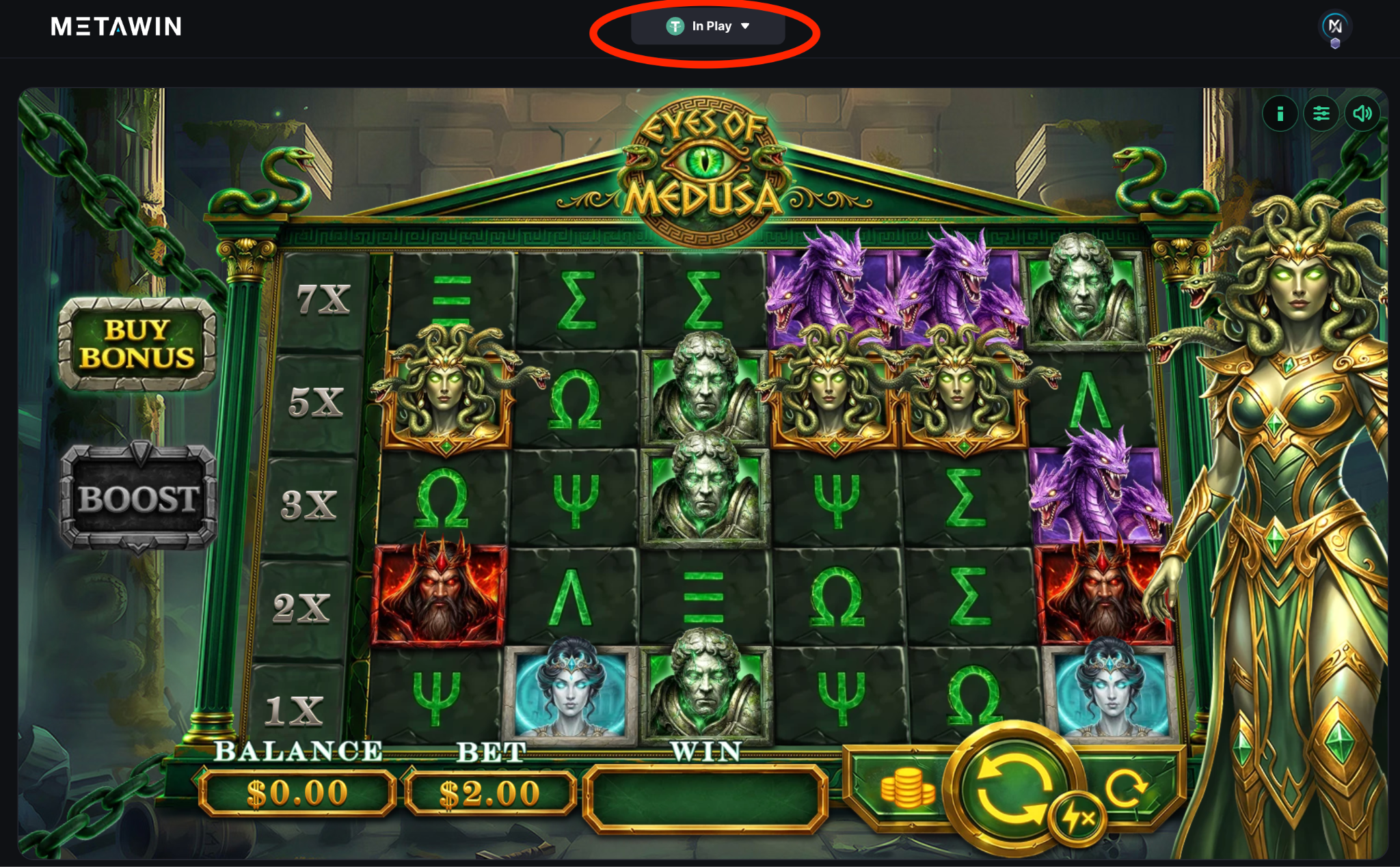
Once the transfer clears, your USDT appears in the relevant MetaWin balance and is ready to use across the site. There is no separate Tether-only section to find, so you can open any supported game and select USDT from the currency menu before placing your first bet.
The same balance works across slots, live casino tables, and MetaWin Originals. You can use it for a few spins on a slot, join a live blackjack or roulette table, or explore MetaWin's original casino games such as Mines, Plinko, and Crash.
As mentioned earlier, USDT tracks the US dollar, so crypto price movements should not change the value of your balance in the background.
Your winnings are credited back to the same MetaWin balance you played from. That keeps the whole session easy to track in dollar terms, whether you deposited through Web3 Wallet or Transfer Crypto.
Author's Thoughts
Matija Antic
Playing in USDT keeps the maths simple. A $100 balance stays roughly $100, so you can track a session in dollars without keeping one eye on the market.
How to Withdraw Your USDT Winnings
When you're ready to cash out, open the Cashier and switch to the Withdraw tab. Select Tether, choose the network you want to use, then paste the address of the wallet or exchange where you want the funds sent.
Before you confirm anything, check that the receiving address supports the same network you selected in MetaWin. If you choose Tron, for example, the destination must accept TRC-20 USDT.
Enter the amount you want to withdraw, review the destination address and network one more time, then submit the request. MetaWin processes the withdrawal once it has been approved, and the final arrival time depends on the network you picked.
A network or provider fee may also apply, with the exact amount shown in the Cashier before you confirm. That makes it easy to compare your options, especially when withdrawing from an online casino with USDT TRC20 support.
Tips for Depositing and Playing with Tether
- Always match the network from start to finish - the option selected in MetaWin must be the same one used by your wallet or exchange, whether that is Ethereum, Tron, Solana, or one of the supported Web3 networks.
- Send a small test amount when using a new address - it adds one extra transfer, but it is the safest way to confirm that the address and network are correct before moving the rest.
- Keep enough aside to cover the fee - some wallets charge the fee in the network's native token, so you may need ETH, TRX, or SOL rather than extra USDT.
- Check the full deposit address before sending - compare the first and last few characters after pasting it, and copy it directly from the live Cashier each time.
How Tether Deposits Compare to Other Cryptos at MetaWin
The biggest difference between USDT and MetaWin's other supported coins is what happens to the value of your balance after you deposit. Tether is designed to stay close to the US dollar, so the amount you hold should remain relatively steady throughout your session.
Bitcoin, Ethereum, and Solana work differently. Their prices can rise or fall while you play, which means the same coin balance may be worth more or less by the time you withdraw.
That is not necessarily a downside. If you already hold BTC and do not want to swap it first, our guide explains how to deposit and play with Bitcoin.
Players holding ETH can follow the steps to deposit and play with Ethereum, including the available network options. We also cover how to deposit and play with Solana through either Web3 Wallet or Transfer Crypto.
USDT makes more sense when you want the value of your balance to remain steady. BTC, ETH, and SOL suit players who already hold those coins or are comfortable with their value moving alongside the market.
Whichever one you choose, the process starts in the same MetaWin Cashier, where you select the coin and deposit method you want to use.
Did you know?
Tether (USDT) is the most-traded cryptocurrency in the world - its daily trading volume routinely tops even Bitcoin's, making it the settlement layer much of crypto actually runs on. And because it's a stablecoin pegged 1:1 to the US dollar, the money sitting in your casino balance doesn't lurch up or down with the market the way Bitcoin or Ethereum can - a $50 USDT balance is still worth about $50 an hour later.


