


Solana is one of the quickest and cheapest ways to fund an online casino account, and MetaWin gives you two ways to get your SOL onto the site.
You can link your Solana wallet to your MetaWin account and play straight from your own balance, or send SOL to a MetaWin deposit address and let the casino hold the funds for you, which works better if you're moving SOL over from an exchange.
Here we'll walk you through both methods and explain how to deposit SOL at MetaWin casino, screen by screen, and cover the things that aren't obvious from the interface itself, like which method to pick, what the network fees actually look like, and how withdrawals work on each side.
Why deposit with SOL at MetaWin?
Solana settles transactions in under a second and charges fractions of a cent in network fees, so it's one of the cheapest and fastest ways to fund a casino account.
That helps with day-to-day play because deposits clear before you've switched tabs, and withdrawing smaller wins is worth it because the fees don't eat into the payout.
The other reason MetaWin is a good place to play with SOL online is that you don't have to give up custody to play. Linking a Solana address through the web3 wallet method keeps your SOL in your own Phantom or Solflare wallet the whole time, and each bet gets signed from there. Most online casinos don't offer this option, and the ones that do usually limit it to a smaller selection of games.
Once you're set up either way, your SOL works on MetaWin's full library of 5,000+ titles, including the live dealer tables and the in-house originals like Mines, Plinko, and Crash. There's no separate SOL-only lobby and no games gated behind a different currency.

Author's Thoughts
Matija Antic
Fees are the reason I use SOL for casino play. At fractions of a cent per transaction, withdrawing a small win is actually worth doing, which isn't true on every chain.
Web3 Wallet vs. Custodial Wallet - what's the difference?
With the web3 wallet method, the funds stay in your own wallet, and each bet gets signed from there. With the custodial method, you send your SOL to a MetaWin deposit address, and the casino holds it for you in a balance you draw from as you play.
The web3 wallet route works better if your SOL is already in a self-custody wallet (Binance Wallet, MetaMask, SafePal, Trust Wallet, Fireblocks, OKX Wallet, TokenPocket, Bitget Wallet, Uniswap Wallet, and 550+ more via WalletConnect).
You connect the wallet to your MetaWin account once, and from then on, you play directly from your own balance.
MetaWin can read what's in the wallet and request signatures for individual bets, but it can't move your funds without you approving each transaction.
The custodial option might be better if your SOL is on an exchange like Coinbase, Binance, or Kraken.
However, exchanges don't support WalletConnect, so you can't link them to MetaWin the way you would a self-custody wallet. Instead, you withdraw the SOL to a MetaWin deposit address, and it shows up in your custodial balance once the network confirms it.
Good to know
Both methods unlock the full game library. Your choice depends on whether you want to retain self-custody (Web3 Wallet) or have MetaWin hold the funds (Custodial Wallet). You can mix and match.
What you'll need before you start
Whichever method you choose, here are a few things you'll want to have lined up:
- A funded SOL wallet (Phantom, Solflare, Backpack, Ledger, or Coinbase Wallet - any wallet that supports WalletConnect works)
- A registered MetaWin account (you can sign up at metawin.com if you don't have one yet)
- A small amount of SOL set aside for network fees, usually a fraction of a cent per transaction
- A device with a stable internet connection, desktop or mobile
Method 1: Link your Solana wallet to MetaWin (best for most players)
This is a one-time setup, and it's quicker than you'd think.
Let's walk through it:
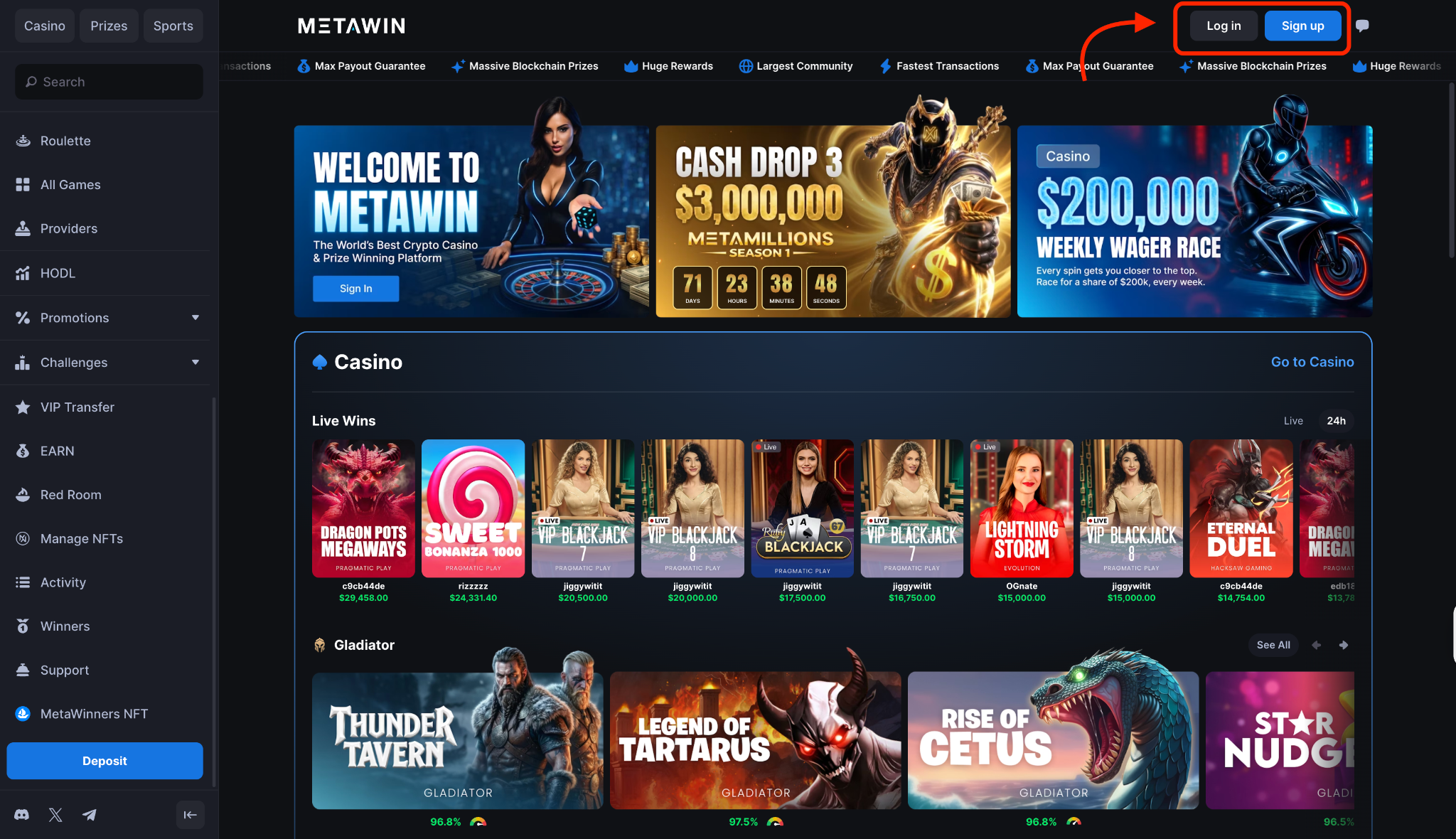
Step 1: Sign in to your MetaWin account
If you already have an account, head over to MetaWin and hit the Log In button in the top-right corner of the homepage.
If you don't have an account yet, click Sign Up instead and run through the registration form, which takes under a minute. Once you're logged in, you'll land on the main lobby with your account active.
Step 2: Open Account Settings and find "Add Solana Address"
Click your profile icon in the top-right corner and select Account Settings from the dropdown.
Scroll down until you reach the wallet linking section, where you'll see a row for Solana with a Connect button next to it. That's the one you want.
Step 3: Click "Add Solana Address"
You'll see a modal with a quick rundown of what wallet linking unlocks, mostly easier deposits and withdrawals straight from your wallet. Click Connect Wallet at the bottom of the modal when you're ready to pick which wallet to link.
Step 4: Choose your wallet from the picker
The wallet picker opens with the most popular options up top, and Phantom and Solflare are both in the featured list if that's what you're using.
If you've got something else, you can either scan a QR with your mobile wallet through WalletConnect or search the full list of 550+ supported wallets from the bar at the top.
Step 5: Approve the connection in your wallet
The next step plays out in your wallet, which opens a connection request asking you to approve the link to MetaWin. Approving it gives the site read access to your balance and lets it request signatures for bets, but every transaction still needs your sign-off before anything happens.
Step 6: Confirm your Solana address is now linked
Approving the connection links your Solana address to your account, and the change shows up immediately in Account Settings.
Open your wallet panel and switch to the SOL view at the top, where you'll now see your Web3 Wallet section populated with your SOL balance and any supported SPL stablecoins like USDT and USDC.
Step 7: Hit a game and start playing
You're ready to play once you're in any game. Find the currency dropdown in the stake area and set it to SOL (Web3 Wallet), and every bet you place after that pings your wallet for a signature before it executes. The whole exchange usually wraps up in well under a second on Solana.
Method 2: How to deposit SOL via Transfer Crypto (Custodial Wallet)
The custodial route is the one to go with if your SOL is on an exchange or in a wallet that doesn't connect through WalletConnect. You send SOL to a MetaWin deposit address, wait for the confirmation, and play from a balance MetaWin holds for you.
Here's how each step looks:
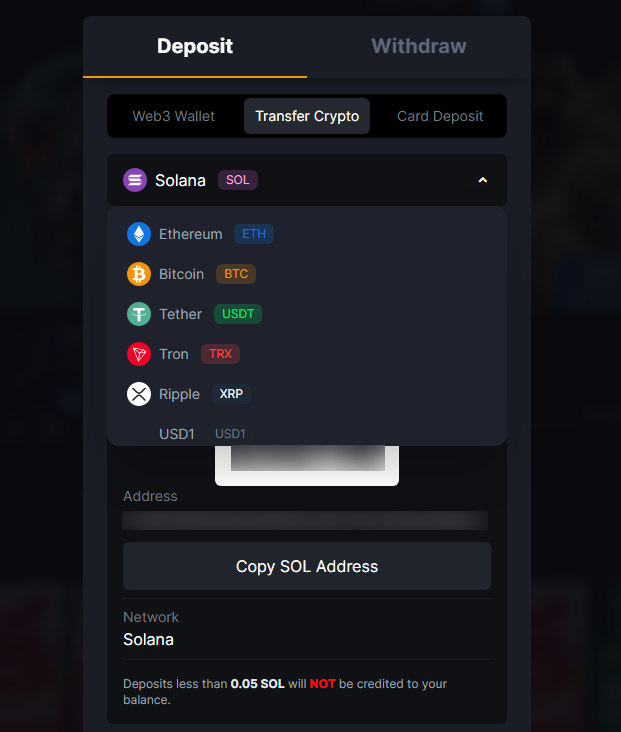
Step 1: Open the Cashier and switch to the Transfer Crypto tab
Click the Deposit button in the top nav to open the Cashier. By default, it lands on the Web3 Wallet tab, so switch over to the Transfer Crypto tab to set up a regular crypto deposit.
The view changes to show a currency dropdown and the deposit address area where you'll generate your SOL address.
Step 2: Select Solana (SOL) from the dropdown
Choosing Solana from the dropdown is the only currency selection you'll make on this screen.
Everything you need for the send loads up immediately on the right side of the screen, and there's no chain selector to chew through afterwards because SOL only runs on the one network.
Step 3: Confirm the network and copy the deposit address
Before you copy anything, double-check that the network label reads Solana mainnet. Then hit the Copy SOL Address button to grab the full string, or scan the QR code if you're sending from a mobile wallet.
Don't send wrapped SOL or SPL tokens from Ethereum or BSC, since the address only accepts funds coming through the Solana mainnet.
Step 4: Send SOL from your external wallet or exchange
Open your wallet or exchange withdrawal screen and paste the MetaWin address into the recipient field. Enter the amount you want to send, confirm the network is set to Solana, and submit the transaction.
Most wallets will show you a fee estimate and a final confirmation screen before broadcasting it to the network.
Step 5: Wait for confirmations and see your Custodial Wallet balance update
Solana usually wraps things up in well under a minute. While the network processes the transaction, the Cashier holds it in a pending state, then updates on its own once it clears.
Head to the wallet panel, open the Custodial Balance tab, and your SOL will be sitting there ready to play with.
How to play with SOL at MetaWin
Once you've got SOL in either balance, the rest plays out like any other currency on the site. Open any game, find the currency selector at the top, and switch it to SOL. Then, your stake controls flip over to SOL amounts straight away.
If both your Web3 Wallet and Custodial balances are funded, the dropdown will show both as separate options, and you just pick whichever one you feel like playing in that session.
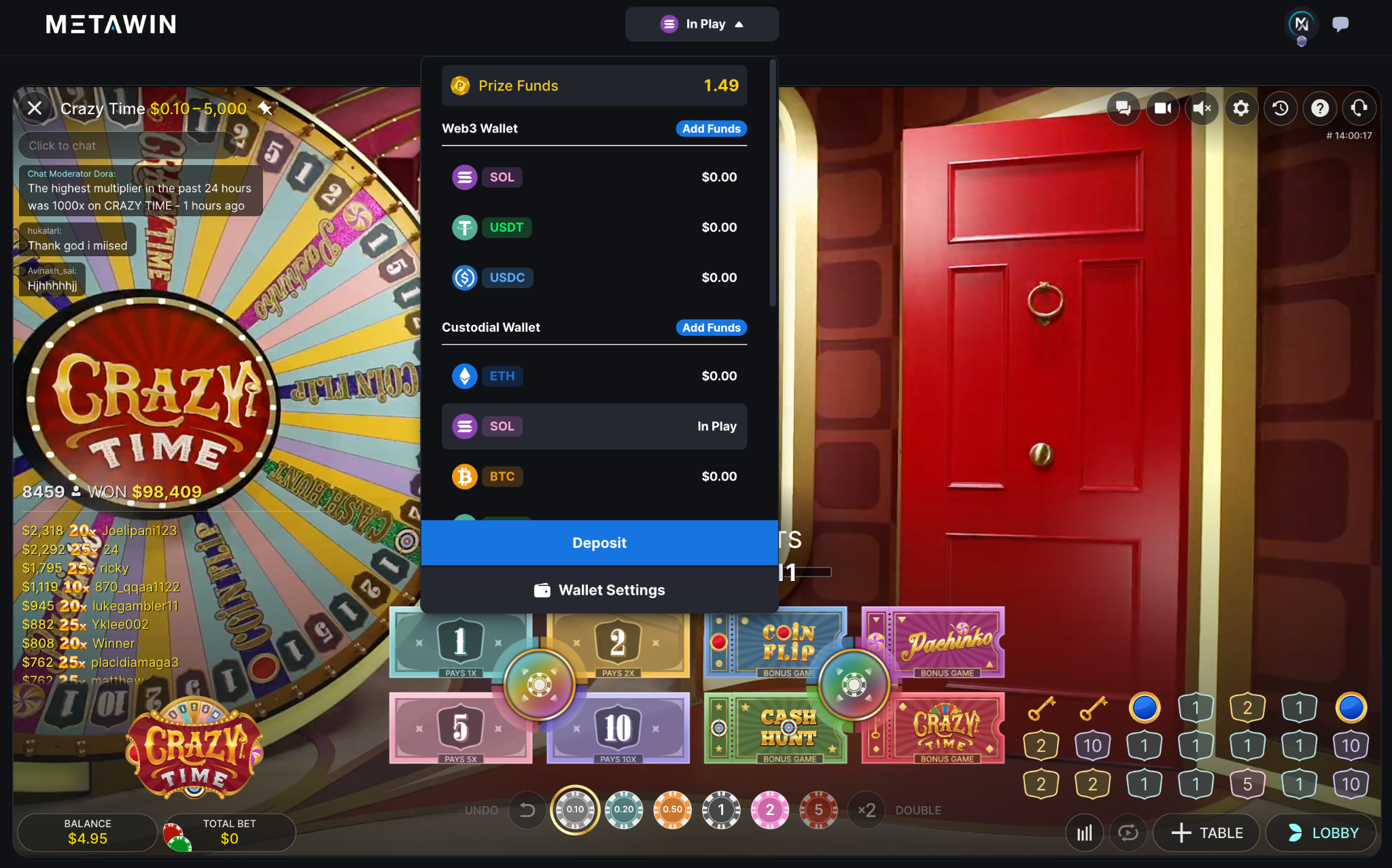
The good news is that SOL isn't boxed into a niche corner of the site. You can spin Sugar Rush, jump into a Crazy Time round, or take a few spins of Mines from the MetaWin Studios lineup.
It all runs on the same SOL balance, and switching between game types stays frictionless without a walled-off lobby in the way.
Stakes scale with whatever you're playing, with most slots and live tables starting around $0.10 in SOL terms.
Winnings credit back to whichever balance you played from; Web3 stays in your wallet, and Custodial stays in MetaWin's wallet section.
Author's Thoughts
Matija Antic
If you've funded both balances, you'll see two SOL options in the currency dropdown. Check which one is selected before your first bet, because winnings go back to whichever balance you played from.
How to withdraw SOL winnings
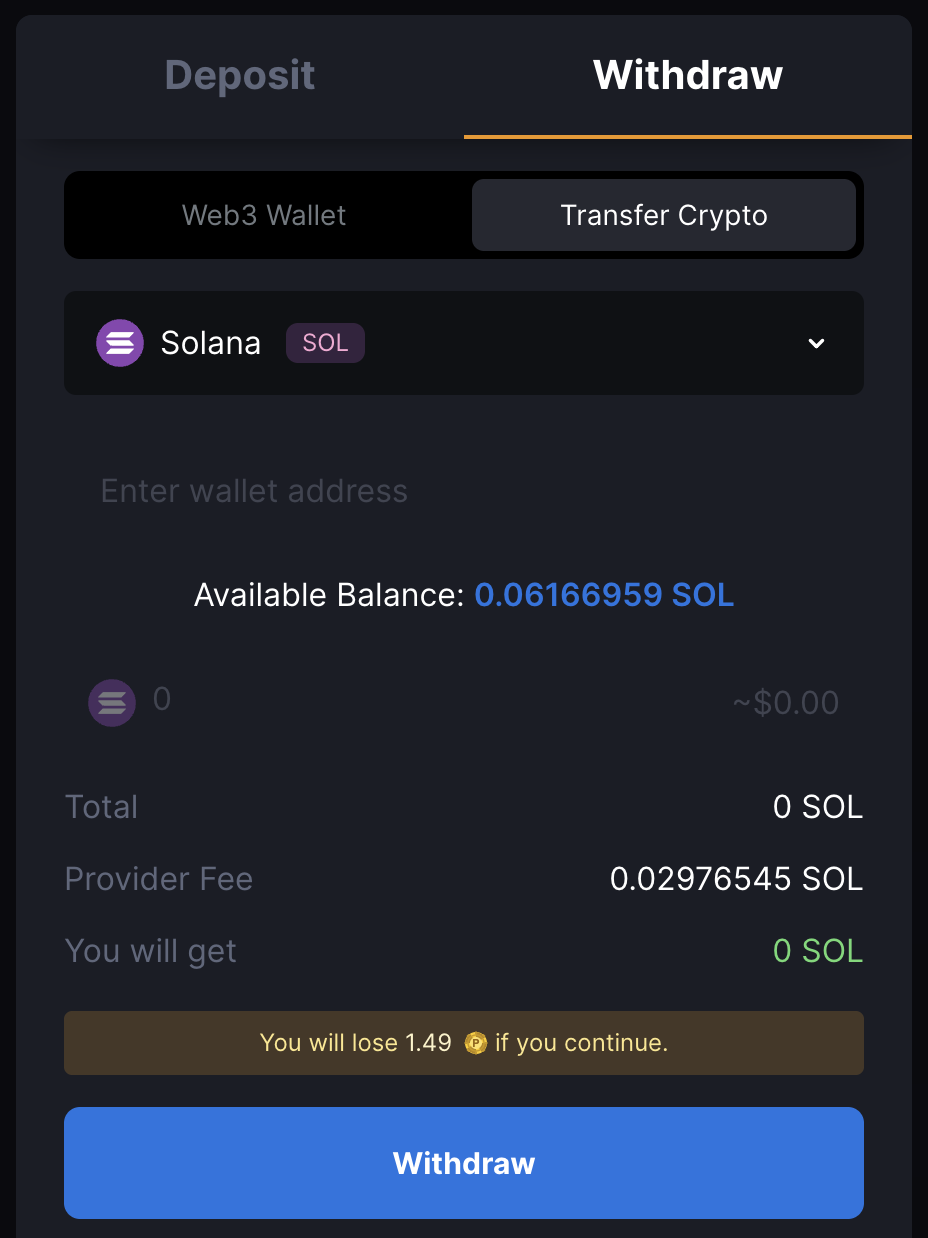
Here's how to get your SOL out, whether you played from your linked wallet or from a Custodial balance:
Withdraw via Web3 Wallet
If you've been playing from your Web3 Wallet balance, there's no real "withdrawal" to make. Your SOL never left your wallet to begin with, so winnings just land back in there as you play, and the balance ticks up in real time.
To move those funds somewhere else, like another wallet or an exchange, hit send in your wallet the same way you would for any other transaction. You can use Phantom, Solflare, or whichever wallet you linked will handle it from there.
Withdraw your Custodial Wallet balance
For SOL in your Custodial Wallet, the withdrawal runs through the Cashier. Open it up, switch to the Withdraw tab, and pick SOL from the currency dropdown. Check that the network reads Solana mainnet, paste your destination address into the address field, type in the amount you want out, and hit confirm.
MetaWin charges a flat provider fee per withdrawal (shown live in the Cashier as you set your amount), and the minimum withdrawal is 0.05 SOL. Solana itself confirms transactions in under a second, but MetaWin runs an internal review on withdrawals first, so the total time depends on how long the review takes.
Give the destination address a quick look before you submit, since blockchain transactions can't be undone once they're sent.
Tips for depositing and playing with SOL
- If you control your own Solana wallet, go with Web3 Wallet - you keep custody, settlement is faster, and winnings stay in your wallet with no withdrawal step on the way out.
- If your SOL is on an exchange, use Transfer Crypto - Coinbase, Binance, and Kraken don't support WalletConnect, so the custodial flow is your only way onto MetaWin from those platforms.
- If you're sending from anywhere, double-check the network reads Solana mainnet - sending through an unsupported chain or bridge can result in lost funds the deposit address won't accept.
- If you stake in SOL but think in dollars, keep an eye on the SOL price - the fiat value of your stake shifts with the market, and what felt like a $20 bet last week might be $25 or $15 today.
- If you want to keep the play sustainable, set deposit limits in your account settings - MetaWin caps how much you can deposit over a given period so you don't have to manage it round to round.
Did you know?
- Solana can theoretically process up to 65,000 transactions per second - faster than Visa's peak throughput - and most transactions cost a fraction of a cent.
- Solana's network uses a unique "Proof of History" mechanism, a cryptographic clock that timestamps events before they're added to the blockchain - a design no other major chain has replicated.


