


There are two ways to deposit Ethereum at MetaWin, and the right one for you depends on whether you've got your ETH in a wallet you control or on an exchange.
Linking a self-custody wallet keeps the ETH in your own hands the whole time, with each bet running through a quick signature from your wallet.
Going the custodial route hands the funds to MetaWin on whichever of the three supported networks (Ethereum mainnet, Arbitrum, or Base) you've chosen to send on.
This guide covers how to deposit ETH at a casino like MetaWin using both routes, screen by screen, and explains the network selection step that doesn't come up with other crypto deposits.
Why deposit with ETH at MetaWin?
The biggest practical benefit to depositing ETH at MetaWin is the network choice. Ethereum mainnet works, but the gas fees can run anywhere from a few cents on quiet days to twenty dollars or more when the network is busy.
Sending on Arbitrum or Base brings those fees down to fractions of a cent, with near-instant confirmation times. For regular ETH casino play, the L2s end up being the cheaper, faster option by a wide margin.
Linking an Ethereum wallet through the Web3 Wallet method also unlocks something the custodial route doesn't, which is MetaWin's on-chain competitions. These are exclusive prize draws and promos that only Web3 Wallet users can enter, since they run on smart contracts tied to the linked address itself.
Once you're set up, you can play with Ethereum online on MetaWin's full library of 5,000+ titles, including the live dealer tables and in-house originals like Mines, Plinko, and Crash.
You can spend the same ETH balance on a slot, a blackjack table, or a live dealer round without swapping between currencies, and nothing on the platform is off-limits because of which cryptocurrency you chose to fund with.

Author's Thoughts
Matija Antic
If you're depositing ETH regularly, send it on Arbitrum or Base. Mainnet gas can hit twenty dollars on a busy day, while the L2s cost fractions of a cent and confirm almost instantly.
Web3 Wallet vs. Custodial Wallet - What's the Difference?
The Web3 Wallet method connects your own wallet to your MetaWin account, so your ETH stays where it is and you sign each bet from your wallet as you play.
This is also the only way to enter MetaWin's on-chain competitions, which are extra prize draws and promotions that exclusively run for Web3 Wallet users. You can connect Binance Wallet, MetaMask, SafePal, Trust Wallet, Fireblocks, OKX Wallet, TokenPocket, Bitget Wallet, Uniswap Wallet, and 550+ more via WalletConnect.
The Custodial Wallet method is the simpler option if your ETH is on an exchange. You send it to a MetaWin deposit address, the casino holds it for you, and you play from a balance that shows up inside your MetaWin account.
Exchanges like Coinbase, Binance, and Kraken don't work with WalletConnect, so this is the way to go if your funds are held there.
Quick Tip
You can use both methods on the same account. Some players keep a custodial balance funded from an exchange for everyday play and a linked wallet for the on-chain competitions, with both ETH balances running side by side.
What you'll need before you start
A few things to have ready before you go through either method:
- A funded Ethereum wallet, whether that's MetaMask, Coinbase Wallet, Rainbow, Ledger, Trust Wallet, or any other wallet that connects through WalletConnect.
- A registered MetaWin account, which you can sign up for here if you don't have one yet.
- A small amount of ETH set aside for gas, since the sending wallet covers the network fee on the way in. Using an L2 like Arbitrum or Base brings the gas down to fractions of a cent compared to mainnet.
- A device with a stable internet connection, either desktop or mobile.
How to deposit ETH via Web3 Wallet (recommended)
You'll only run this setup once. Once your wallet is connected, every future session uses the same linked address with no repeat steps.
Web3 Wallet is also the closest you'll get to an Ethereum casino instant deposit setup, since there's no deposit transaction at all.
Step 1: Sign in to your MetaWin account
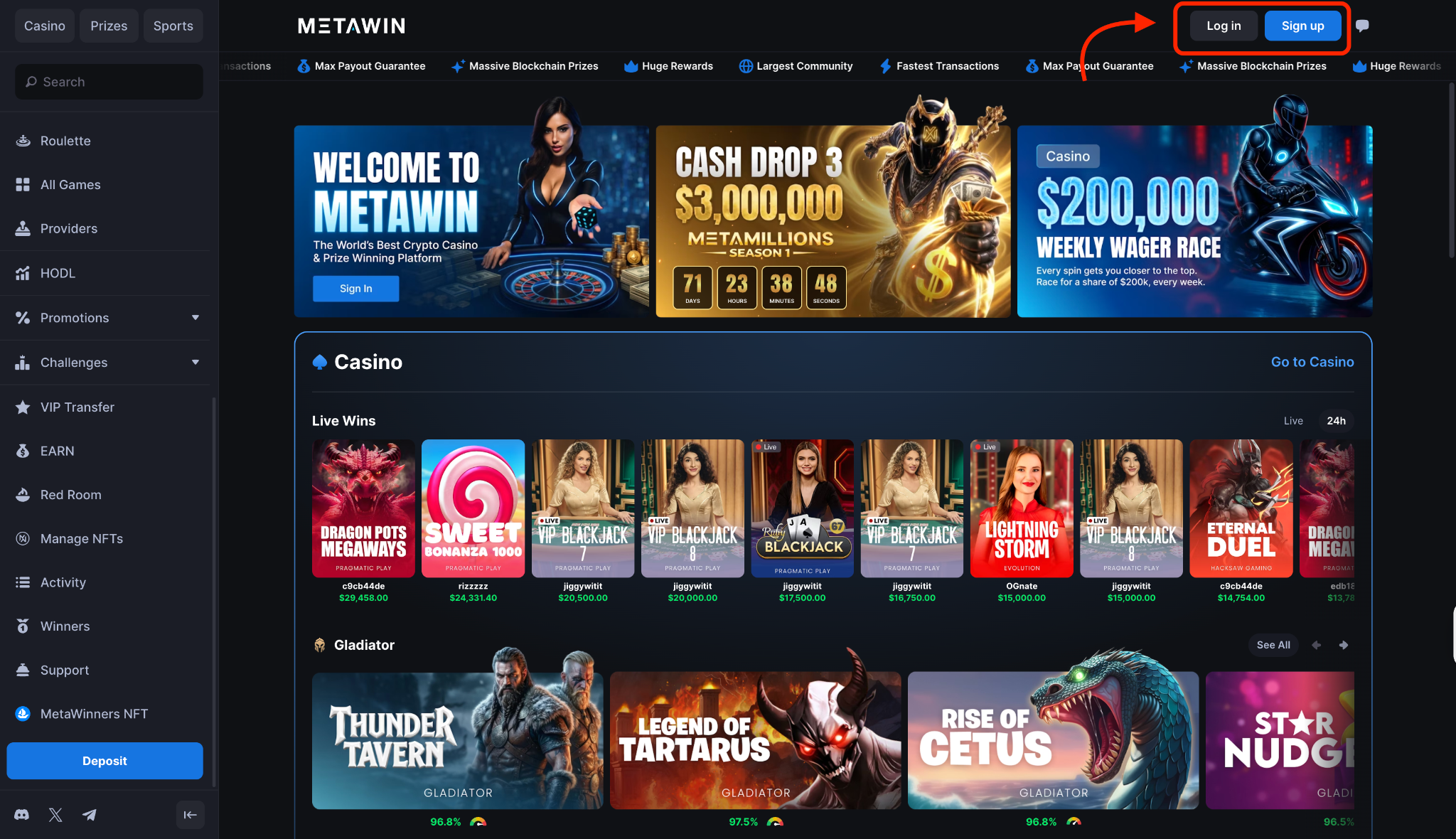
Head to MetaWin in your browser and use the Log In button in the top-right corner to sign in. If you're new to the platform, click Sign Up instead, fill out the short registration form, and you'll be in the lobby in well under a minute.
Step 2: Open Account Settings and find "Add Ethereum Address"
Click your profile icon in the top-right and pick Account Settings from the menu that drops down.
Scroll until you reach the section for linking wallets, where the Ethereum row has a Connect button next to it. That's the one you'll be working with.
Step 3: Click "Add Ethereum Address"
A modal opens with a rundown of what gets unlocked once your wallet is linked. The main benefits are access to MetaWin's on-chain competitions, direct deposits from your wallet, and clean withdrawals straight back to your own address.
Click Connect Wallet at the bottom to continue.
Step 4: Choose your wallet from the picker
When the picker opens, you'll see a grid of the wallets people use most. MetaMask, Trust Wallet, Binance Wallet, SafePal, OKX Wallet, Fireblocks, TokenPocket, Bitget Wallet, and Uniswap Wallet are all in the default lineup.
For anything that isn't, the search bar pulls from 550+ supported wallets, and WalletConnect at the top of the picker handles QR scans for mobile wallets.
Step 5: Approve the connection in your wallet
As soon as you pick a wallet, it pops up asking you to approve the link to MetaWin. Hit approve and you're done. MetaWin can now see your ETH balance and ask you to sign each bet, but it can't touch your funds without you saying yes every time.
Step 6: Confirm your Ethereum address is now linked
Once your wallet signs off, Account Settings updates to show the linked address and the Connect button flips to a connected state.
Pop open the wallet panel and head to the Web3 Wallet section, where your ETH balance is now showing along with any USDT, USDC, or EURC you're holding on the same address.
Step 7: Hit a game and start playing
Open any game in the lobby and set the in-game currency to ETH (Web3 Wallet) before placing your first bet. Each stake from that point on triggers a signature request in your wallet, which you approve in a single tap, and the funds only move once you've signed.
On Arbitrum or Base the whole exchange wraps in under a second, while mainnet takes around 1 to 3 minutes for the bet to fully finalise.
How to deposit ETH via Transfer Crypto (Custodial Wallet)
The custodial method is the second way to deposit Ethereum at a casino like MetaWin, and it's the practical choice when your funds are on an exchange like Coinbase, Binance, or Kraken.
Here's how each step looks:
Step 1: Open the Cashier and switch to the Transfer Crypto tab
Click the wallet button in the top-right to bring up the deposit window, which opens to the Web3 Wallet tab by default.
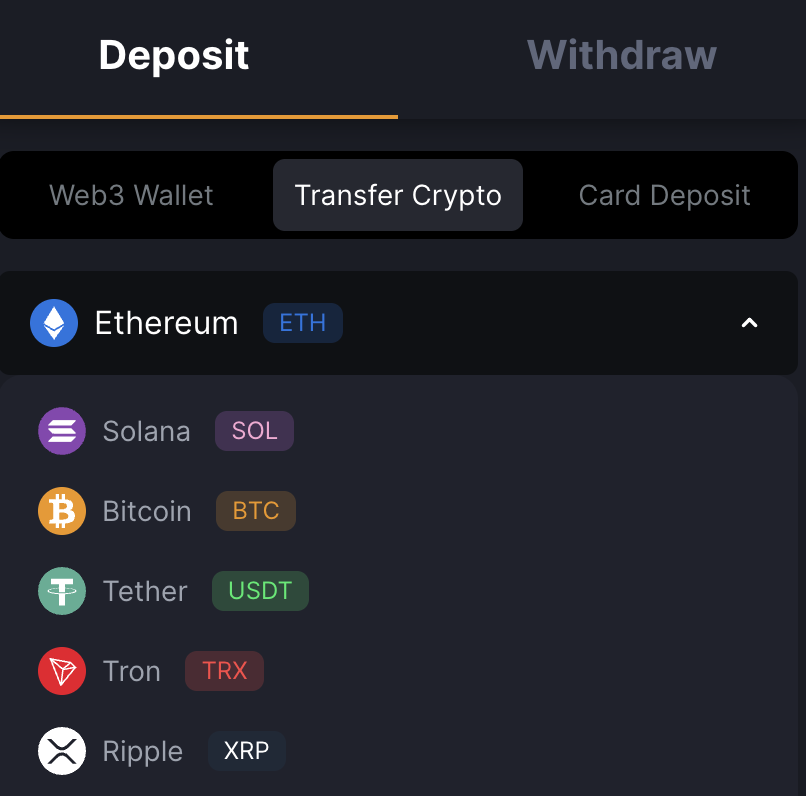
Move over to the Transfer Crypto tab in the middle, and the view swaps in a currency selector and a blank panel underneath, ready for you to pick a coin.
Step 2: Select Ethereum (ETH) from the dropdown
Open the currency dropdown and pick Ethereum. A second dropdown appears right after, with Ethereum mainnet, Arbitrum, and Base to choose from for your sending network.
Once both are set, the panel populates with your unique deposit address, a scannable QR code, the network label, and the minimum deposit notice.
Step 3: Confirm the network and copy the deposit address
Check the Network label one more time before you copy anything, since the address you'll get depends on which network you picked in the previous step.
Once you've confirmed it matches what you want to send on, hit Copy ETH Address to grab the full 42-character string starting with 0x, or scan the QR code from your mobile wallet. Take a quick look at the minimum deposit notice shown on the panel, too.
Step 4: Send ETH from your external wallet or exchange
Open your wallet or exchange withdrawal screen (MetaMask in this example) and paste the MetaWin address into the recipient field.
Enter the amount you're sending, double-check the network selector matches what you picked in MetaWin's Cashier, and submit the transaction. Most wallets will show a fee estimate and a final confirmation screen before broadcasting it.
Step 5: Wait for confirmations and see your Custodial Wallet balance update
The wait varies depending on which network you chose. Mainnet deposits usually take 1 to 3 minutes to fully clear, while Arbitrum and Base land in just a few seconds.
The Cashier marks the deposit as pending until the network finishes, then updates the moment it does. Open the wallet panel, click the Custodial Balance tab, and your ETH is there for play.
Author's Thoughts
Matija Antic
The network you pick in the Cashier decides which address you get. Match it in your sending wallet before you hit submit, because that's the step worth slowing down for with ETH.
How to play with ETH at MetaWin
When you open a game, you'll see both ETH options in the currency selector if you've funded both balances. One is your Web3 Wallet ETH, sitting in your own linked wallet. The other is your Custodial ETH, held inside MetaWin. Pick whichever one you want to play from for that session.
The two work slightly differently in practice. Web3 Wallet bets ask your wallet to sign each one, so there's a small extra tap before the bet goes through. Custodial bets don't need any signing since the funds are already in your MetaWin balance. Outside of that, the experience is the same either way.
Nothing on MetaWin is off-limits to ETH players. The same balance gets you onto Gates of Olympus, into a Lightning Roulette spin, or through a few rounds of Bars from the Originals lineup. Most slots and live tables start around $0.10 per round, so you don't need a big stack to get going.
When you win, the funds settle back to wherever you played from. Web3 Wallet wins land in your linked wallet. Custodial wins stay in MetaWin's wallet section until you decide to withdraw.
How to withdraw ETH winnings
Cashing out ETH plays out differently depending on whether you played from your linked wallet or from Custodial, and here's how each one works:
Withdraw via Web3 Wallet
If you played from your Web3 Wallet balance, the withdrawal step doesn't really apply to you. Your ETH stayed in your wallet the whole time, so winnings drop straight back in as each bet settles, and your balance ticks up in real time.
To send that ETH somewhere else, like an exchange or another wallet, you'd use your wallet's own send function instead of the Cashier.
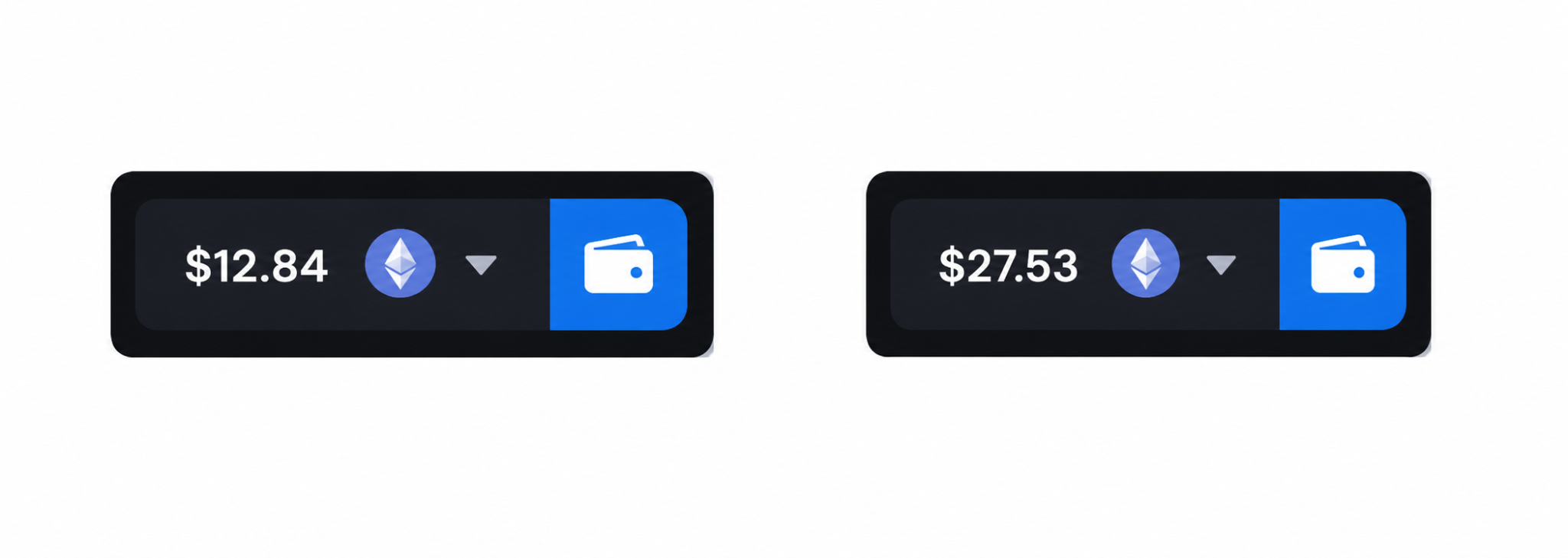
Here's how the balance changed in real time after a winning Plinko drop, and the credit went through in less than a second:
Did you know?
Every Ethereum transaction is paid for in 'gas' - fees that are partially burned, meaning ETH supply can actually shrink during periods of high network activity.
Withdraw your Custodial Wallet balance
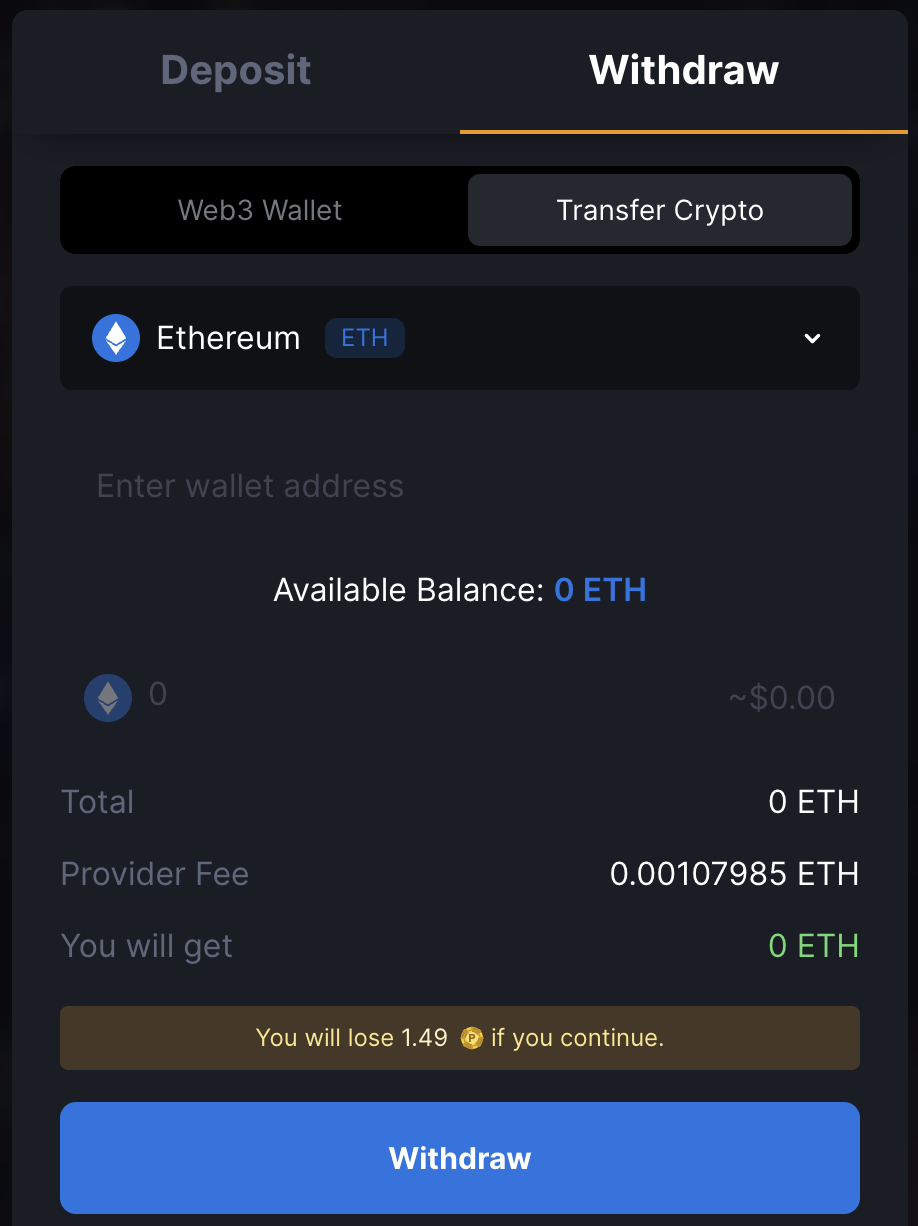
To withdraw the ETH that's in your custodial wallet, you'll need to use the Cashier.
Click the wallet button, head to the Withdraw tab, and pick Ethereum from the currency selector. Confirm which network you're sending on, paste your destination address into the field, enter the amount you want out, and hit confirm.
Most withdrawals clear within a few minutes of being submitted, though the network you picked affects how fast the on-chain side wraps up.
Take one last look at the destination address before you submit, since a blockchain transaction can't be undone once it's on its way.
Tips for depositing and playing with ETH
A few things worth keeping in mind once you've gone through the basics:
- If you control your own Ethereum wallet, go with Web3 Wallet, since you keep custody, get faster settlement, and unlock MetaWin's on-chain competitions in the process.
- If your ETH is on an exchange, use Transfer Crypto, since Coinbase, Binance, and Kraken don't connect to MetaWin through WalletConnect.
- Pick your network carefully, as Ethereum mainnet, Arbitrum, and Base are all supported, but a deposit sent on the wrong chain won't reach the address.
- If you stake in ETH but track your bankroll in dollars, watch the ETH price, since the fiat value of your stake shifts with the market.
- Set deposit limits in your account settings, which caps how much you can deposit over a given period so you don't have to manage it round to round.
Did you know?
Ethereum's switch to Proof-of-Stake in 2022, known as 'The Merge', cut its energy consumption by an estimated 99.95% overnight.


