


If you are buying crypto for the first time, it can feel confusing; but MoonPay is a solid and reliable option for crypto novices. It lets you fund your MetaWin account with familiar fiat payment methods.
In this guide, we will break down how to use MoonPay, what fees to expect, and how to complete your first deposit at a MoonPay casino like MetaWin with confidence.
What Is MoonPay?
MoonPay is designed for people who want to play at crypto casinos but are new to the crypto game. It is a fiat-to-crypto on-ramp that lets you buy crypto with familiar payment methods directly at MetaWin, instead of diving straight into an exchange.
In simple terms, if you are wondering what MoonPay is, it simplifies the whole payment process: choose an asset like Bitcoin, Ethereum, or USDC, pay with your card, Apple Pay, Google Pay, bank transfer, or any other supported method, and receive crypto directly into your wallet.
Its biggest selling point is its ease of use compared to some of the crypto exchanges, which have the potential to feel overwhelming to the uninitiated. In terms of MoonPay as a trustworthy partner and payment processor; It uses AES-256 encryption, is PCI-DSS compliant, and holds ISO 27001 certification.
Why MetaWin Uses MoonPay
Here at MetaWin, we use MoonPay because it gives players who want to dip their toe into crypto casino gaming a smoother route into our wallet-in, wallet-out experience without compromising on our Web3 identity. Instead of forcing users to head to an exchange, we believe that players used to fiat transactions should be able to pick up a popular asset like Bitcoin or Ethereum and head straight into playing with the minimum of fuss.
MoonPay is a good fit for our wallet-first, pseudonymous gameplay, giving you direct access to supported tokens like ETH, BTC, SOL, USDT, USDC, and a range of other altcoins and memecoins. It is the first step in your crypto gambling journey, and we want to make it as simple as possible for you.
Step-by-Step: Deposit at MetaWin with MoonPay
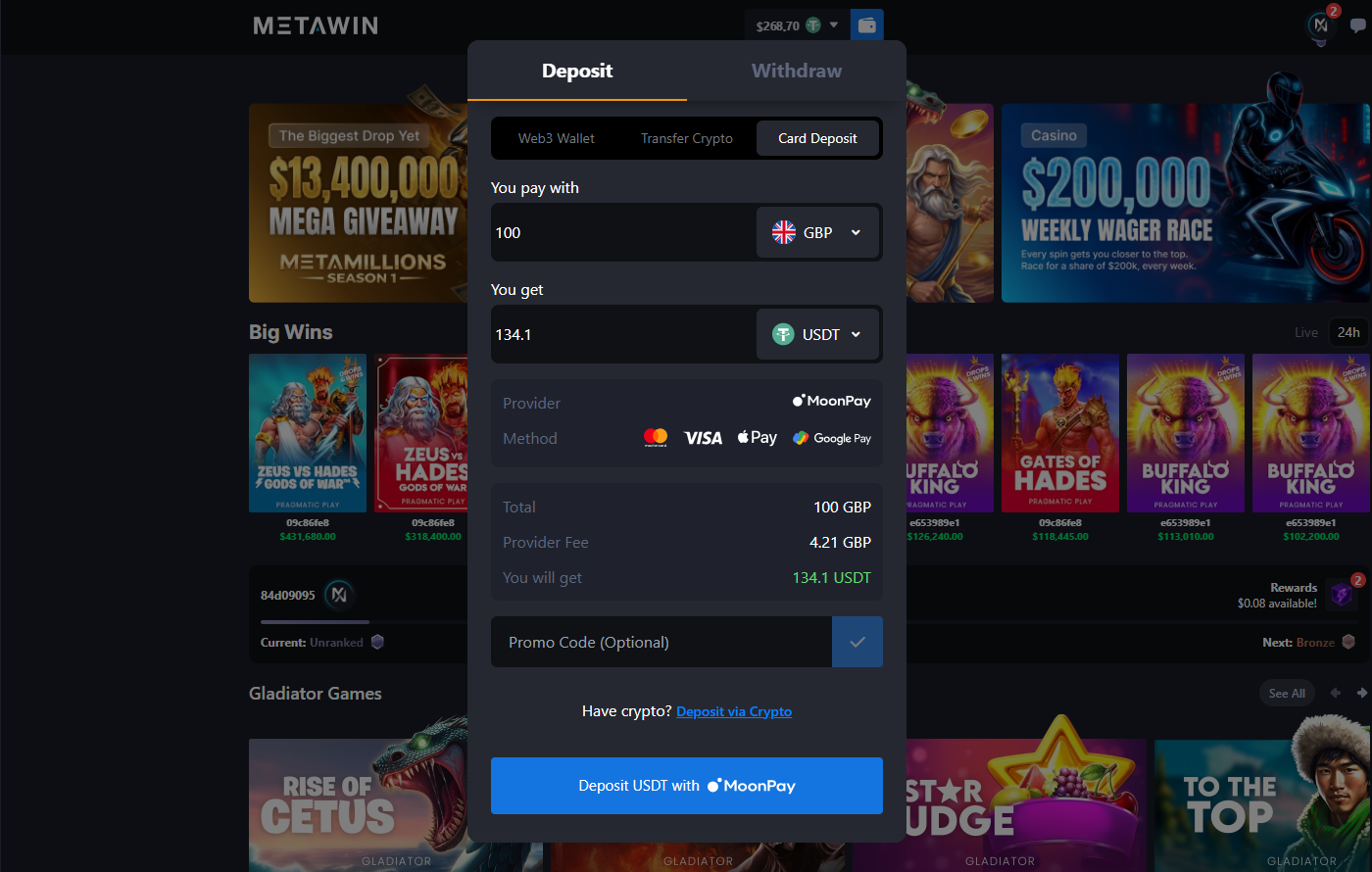
- Login to MetaWin: start by signing into your account as normal. Click your balance to open it and select a custodial wallet.
- Click Buy With MoonPay: scroll down and choose "Buy With MoonPay," which opens the purchase flow inside MetaWin and lets you pay using bank cards.
- Choose your fiat currency and enter the amount: pick your currency, then type in how much you want to spend. You will see the size of your MoonPay deposit, along with the crypto amount you will receive, before you confirm.
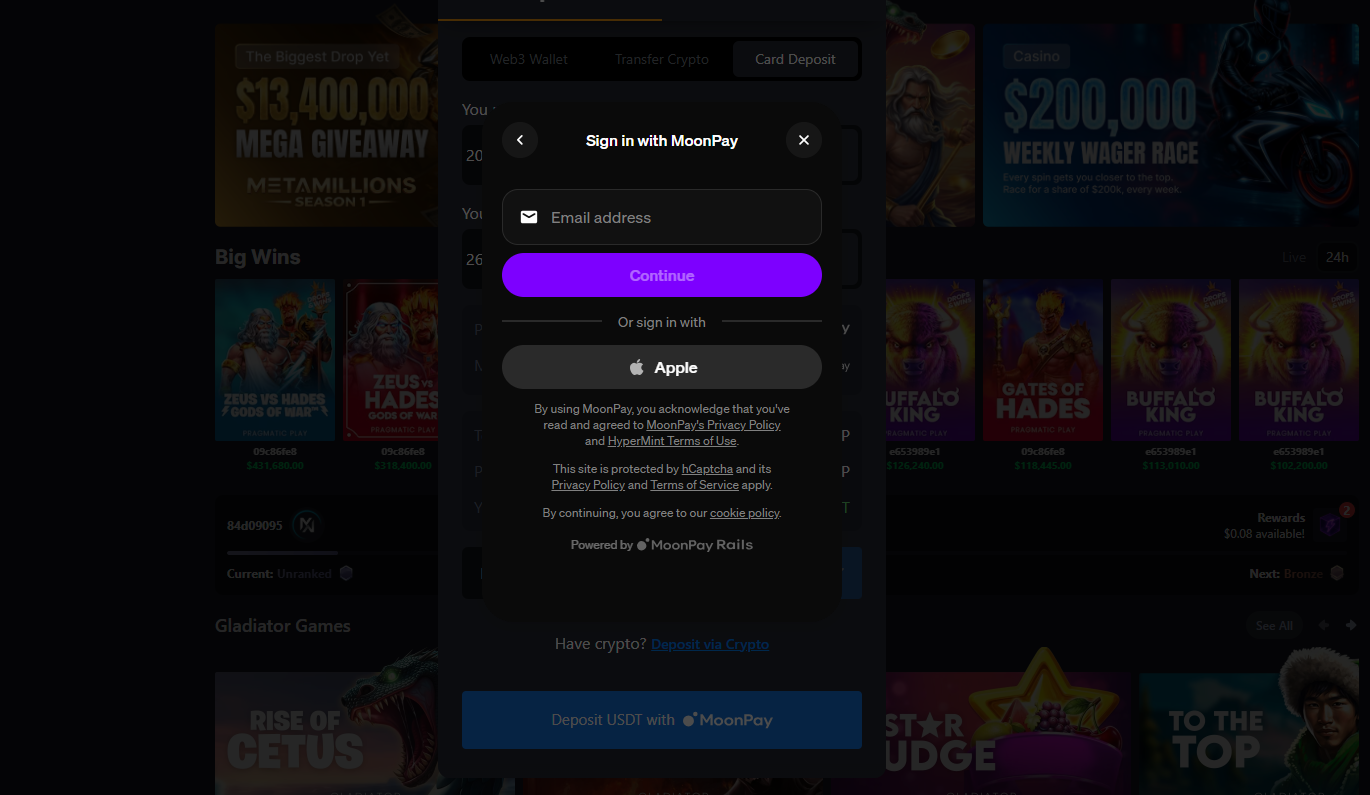
- Enter payment details and complete verification: MoonPay will ask for your payment method and may request proof of ID or age. These are standard MoonPay identity checks for fiat purchases.
- Review fees, confirm, and wait for processing: before you finish, check the exchange rate, any MoonPay fees, and any network costs.
Identity Verification: What to Expect
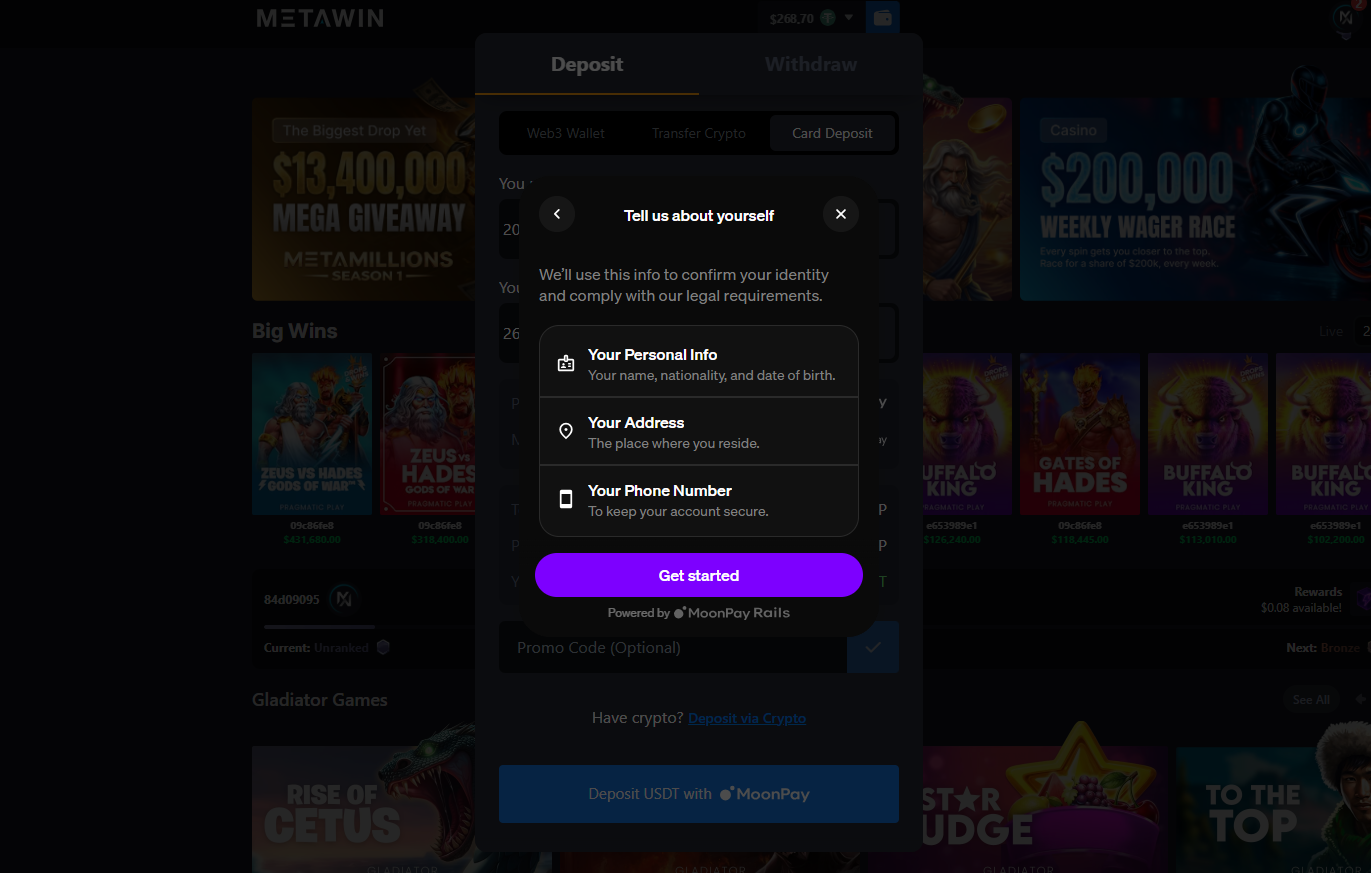
For MoonPay's identity verification, you will need to provide a few pieces of information, including proof of identity and address, before you complete a purchase. Unlike using crypto already stored in your wallet via MetaWin's wallet-in, wallet-out flow, the fiat on-ramp is subject to MoonPay's identity verification. You might need to submit a copy of a government-issued ID, such as a passport or driver's license, and you may be asked to take a selfie to confirm your identity.
Payment Methods and Processing Times
| Payment Method | Fee | Speed |
|---|---|---|
| Credit/Debit Card (Visa, Mastercard) | 4.5% (min $3.99) | Instant |
| Apple Pay | 4.5% (min $3.99) | Instant |
| Google Pay (Android) | 4.5% (min $3.99) | Instant |
| PayPal | 4.5% (min $3.99) | Instant |
| Venmo | 4.5% (min $3.99) | Instant |
| SEPA Bank Transfer (EUR) | 1% (min $3.99) | 1-3 business days |
| UK Faster Payments (GBP) | 1% (min $3.99) | 1 business day |
| MoonPay Balance | 0% | Instant |
Supported Cryptocurrencies
We support over 25 tokens, including BTC, ETH, SOL, Tether, USDC, DAI, LTC, DOGE, SHIB, BNB, MATIC, TRX, EOS, PEPE, and BONK, among others. This gives you plenty of flexibility when gambling with crypto and buying it with MoonPay.
For beginners, you can use MoonPay to buy crypto stablecoins like Tether and USDC, which track a fixed exchange rate and are not subject to the regular fluctuations you might see with some altcoins or with Bitcoin and Ethereum.

Author's Thoughts
Jeffrey Gynn
If you're buying crypto for the first time through MoonPay, a stablecoin like USDT or USDC is the easy choice. Its value tracks the dollar, so your first deposit won't shrink because the market moved.
Purchase Limits
The minimum MoonPay purchase is $20 (or the equivalent in your local fiat currency). There is no single fixed maximum; your limits are set individually based on your verification status and jurisdiction. As you complete more transactions and provide additional verification, your limits increase gradually.
Payment method limits reset on a rolling basis, exactly 24 hours or one month after a transaction. If you hit an account-level limit, MoonPay will prompt you to submit additional documentation to unlock higher amounts.
Supported Countries and Restrictions
MoonPay operates in over 160 countries, including the US, UK, EU, Canada, and Australia. It supports purchases in your local fiat currency, so there is no need to convert before buying.
Availability varies by country and region. MoonPay is unavailable in sanctioned or high-risk jurisdictions. Check MoonPay's supported countries page for the latest coverage in your area.
If MoonPay is not available in your region, you can still deposit at MetaWin by purchasing crypto on a separate exchange (such as Coinbase or Kraken) and transferring it to your Web3 wallet before connecting to MetaWin.
MoonPay vs Direct Wallet Deposit
If you already hold crypto, depositing directly from your wallet is faster and fee-free on MetaWin's side. You connect your Web3 wallet, approve the transaction, and the funds land in seconds with only the standard network gas fee.
MoonPay is the better route if you are starting from fiat (dollars, euros, pounds) and do not yet have crypto in a wallet. It handles the exchange for you, but you pay MoonPay's processing fee (4.5% for cards, 1% for bank transfers) plus a network fee on top.
In short: use a direct wallet deposit if you already own crypto; use MoonPay if you need to buy crypto first.
Author's Thoughts
Jeffrey Gynn
MoonPay is the on-ramp, not the everyday route. Once you hold crypto in a wallet, depositing directly skips MoonPay's processing fee altogether.
Troubleshooting Common Issues
If your card is declined, you might be banking with a provider that blocks crypto purchases, or it may be because of MoonPay's verification checks. Some players may also face country or regional restrictions. If the transaction is pending, it could be due to on-chain delays, including processing delays. You can check MoonPay's status updates for more information.


